







How to redesign a website without losing your Google rankings
By Krystian Swierk, Kreate Vision, Palatine IL
You keep your Google rankings through a redesign by treating your old URLs as inventory, not memory: pull every URL Google actually has on record, map each one to a genuine equivalent with a permanent 301, and validate every redirect with a script before you launch and again after. Skip any of those three steps and you are gambling with traffic that already exists.
We ran this process in June 2026 for a remodeling contractor client on Chicago’s North Shore whose site had just moved off WordPress onto a custom build with 340 redirects in place and, as it turned out, 169 legacy URLs still unmapped. The Search Console export from the day our audit started shows what that looks like from Google’s side: 205 old URLs returning 404 and 275 pages Google had discovered but stopped trying to index (Kreate Vision measurement, Google Search Console, June 1, 2026).
Start with the URLs Google already has, not the ones on your sitemap
A redesign brief usually lists the pages the new site will have. It rarely lists every URL Google indexed on the old one over the years, including pages nobody remembers creating.
WordPress and similar platforms generate URLs beyond the pages someone deliberately built: category and tag archives, date archives, author pages, paginated indexes, feed files. Google indexes those too, and every one becomes a dead end the day the new site goes live if nobody accounts for it.
The Search Console Page Indexing export pulled the day the migration audit started, before any redirect work began.
| Status (June 1 GSC export) | Pages |
|---|---|
| Indexed | 1 |
| Not found (404) | 205 |
| Discovered, not indexed | 275 |
| Crawled, not indexed | 89 |
| Redirects | 39 |
| Excluded by noindex | 2 |
| Other 4xx | 1 |
| Alternate page with canonical | 1 |
The single indexed page in that export was not the real state of the site. It was a snapshot taken while Google was still reprocessing the migrated domain, and GSC’s indexing reports lag live state by several days. The 404 and discovered-not-indexed rows were real, though, and those are the rows a redirect inventory exists to shrink. That is why this export gets pulled before anything is touched, not after something already looks wrong.
On this project, the legacy inventory came from two places: the Internet Archive’s historical crawl of the old domain (298 archived URLs) and the Search Console data for the domain itself. That combination catches URLs the archive missed and URLs Search Console had stopped reporting on but still had on file (Kreate Vision measurement, Internet Archive CDX and Google Search Console, June 9, 2026).
Map every legacy URL to its closest real equivalent, not the homepage
Google is explicit that mapping matters more than volume. Its own site-move guidance warns against redirecting “many old URLs to one irrelevant single URL destination, such as the home page of the new site,” because that pattern “can confuse users and might be treated as a soft 404 error” (Google Search Central, Site moves with URL changes, retrieved 2026-09-04).
On this project that meant building the redirect map topic by topic instead of pattern by pattern. Old blog post slugs went to the matching new article, not the blog index. Old category and location pages went to the matching service page where a genuine match existed. Anything with no real equivalent, mostly WordPress theme files and feeds, was left to return a 404 on purpose, because a fake destination helps nobody.
A sample of the mapping logic from the June 2026 redirect rebuild; only patterns with a genuine destination received a 301.
| Old URL pattern | New destination |
|---|---|
| Individual blog post slugs | The matching article on the new blog |
| Category and tag archives | The matching service page, where one existed |
| Old portfolio and gallery pages | The new projects and gallery sections |
| Service-plus-city landing pages | The matching service and city page |
| Theme files, feeds, admin paths | Left as 404 on purpose |
If your business runs city-specific service pages, the redirect logic on a redesign gets more complicated, not less. We wrote about when that page structure is worth the added complexity in should a Palatine business have city pages.
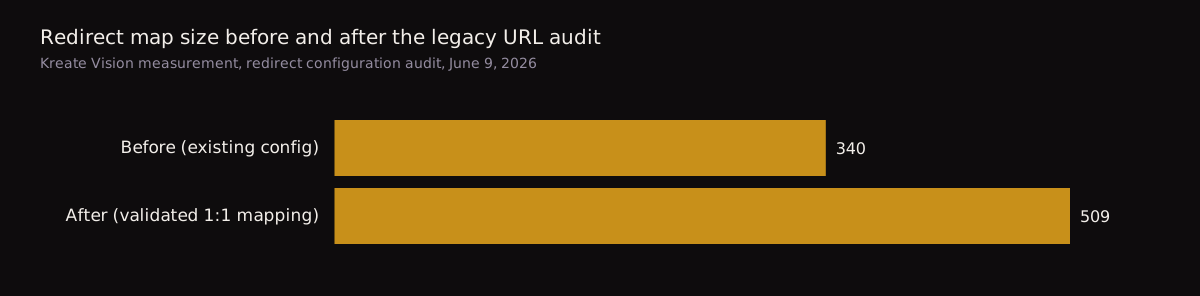
The redirect map on this project grew from 340 entries already in place to 509 after this pass, a net addition of 169 mapped URLs the old configuration had missed (Kreate Vision measurement, redirect configuration audit, June 9, 2026).
A 301 is not a 307, and your CDN might be quietly serving the wrong one
Google draws a hard line between the two. Permanent redirects, 301 and 308, “show the new redirect target in search results.” Temporary redirects, 302 and 307, “show the source page in search results” instead (Google Search Central, 301 redirects, retrieved 2026-09-04). A 307 tells Google the old URL might come back, so Google keeps crediting the old URL rather than transferring its ranking signal to the new one.
This is not only a your-app-config problem. On this project, every redirect inside the site’s own configuration was set to 301. The apex domain redirect, the one that sends the bare domain to the www version, sat at the CDN layer in Cloudflare, and it was still returning a 307 when the migration report went out. Nothing in the application code controlled it. It needed a two-minute change in a Cloudflare Redirect Rules dashboard that nobody had made.
If you only check the redirects you wrote, you will miss the ones your CDN, load balancer, or DNS provider added on their own. Check the actual HTTP response code, not just the file where you configured it.
The status code question matters beyond Google’s ranking algorithm, too. AI answer engines read the same signals when deciding what to cite; we covered that gap in SEO gets you ranked, AEO gets you quoted.
Validate every redirect with a script, before launch and again after
A spreadsheet of intended redirects tells you what should happen. It does not tell you what actually happens once the new site is live. The gap between the two is where rankings get lost quietly, one URL at a time, until traffic is already gone and nobody has noticed yet.
The method we use pulls the actual list of URLs Search Console still has on record for a domain, using real impression data over a rolling window instead of guesswork, and checks each one against the live redirect configuration. Anything with no matching rule gets flagged before launch. Anything that returns the wrong status code once live gets flagged after. That second pass matters because a redirect rule can be correct in the config file and still get intercepted or overridden somewhere between the server and the browser, the way the apex-domain 307 was.
Run the check once before the new site goes live, so missing mappings surface while they are still cheap to fix. Run it again after launch, against the live domain, because a redirect that works in a preview environment does not always survive contact with production.
Keep titles and H1s stable on the pages that make you money
A redesign changes layout, not necessarily language. Rewriting the title tag and H1 on a page that already ranks resets part of the signal Google associates with that URL, at the exact moment you are already asking Google to trust a new template around it.
Google’s own guidance is blunt about timing: for a medium-sized site, “it can take a few weeks or more for Google to gradually start showing the new URLs instead of the old ones” after a move, and longer for larger sites (Google Search Central, Site moves with URL changes, retrieved 2026-09-04). Changing the wording on your best-performing pages during that same window adds a second variable Google has to re-evaluate on top of the redirect itself.
Redesign the layout, the components, the visual system. Leave the title tag and H1 wording on your top-traffic pages alone unless you have a specific, tested reason to change it. If you do change it, change it after the redirect signal has settled, not in the same release. A redesign is also usually when page speed gets addressed, and that has its own cost if it slips through the cracks; see your website’s speed is a revenue number.
The redesign checklist: what breaks if you skip each step
Each row is a step from the North Shore migration; the second column is what actually happens when a redesign skips it.
| Step | What breaks if you skip it |
|---|---|
| Pull every URL Google has indexed, from Search Console and an archive tool, not memory | You redirect the pages you remember and 404 the ones you forgot; Google logged 205 of those on this project alone |
| Map each legacy URL to a genuine equivalent, not the homepage | Google can treat the redirect as a soft 404 and pass no ranking value at all |
| Make every redirect a 301, and check the CDN layer separately from your app config | A 307 anywhere in the chain tells Google to keep crediting the old, dead URL |
| Validate every redirect with a script before launch | Broken mappings ship to production and sit there until someone notices lost traffic |
| Validate again after launch, against the live domain | Configuration that worked in staging can be intercepted or overridden in production, invisibly |
| Keep titles and H1s stable on top-traffic pages | You add a second signal change on top of the redirect Google is already reprocessing |
| Resubmit your sitemap the day you launch | Google keeps crawling the old sitemap’s URL list and finds fewer of the new pages, more slowly |
| Watch Search Console coverage for 30 days after launch | A redirect that silently breaks in week two goes uncaught |
On this project, the sitemap resubmission (338 URLs, 0 errors) went out the same day as the redirect deploy, through the Search Console API, with a fresh coverage pull planned about two weeks later to check the 404 count against the day-one baseline (Kreate Vision measurement, Google Search Console, June 9, 2026).
What this means if you are about to hire someone for a redesign
If you are a Chicagoland business owner about to sign a redesign contract, three questions separate an agency that has done this before from one that has not.
Can you show me the full list of URLs Google currently has indexed for my site, before you touch anything? A shrug means they have not pulled Search Console data, and they will find out what you had only after it is gone.
Will every redirect be a permanent 301, and can you show me a validation check before and after launch? A yes with no proof to back it up is not a yes.
What happens to the titles and headlines on my highest-traffic pages? If they cannot name your highest-traffic pages, they have not looked at your data at all.
This is how we run redesigns at Kreate Vision: we build on Astro, we quote the work after one conversation instead of a multi-round proposal cycle, and we are in Palatine, so the person doing the redirect audit is reachable, not a ticket queue. Redirect and indexing work sits inside our SEO and AEO service. A few of our redesigns are at our work, and if you are weighing what a redesign should cost for a remodeling business specifically, we broke that down in what a remodeler website costs in the Chicago suburbs.
Sources
- Google Search Central, “Site moves with URL changes,” retrieved 2026-09-04
- Google Search Central, “301 redirects,” retrieved 2026-09-04
- Kreate Vision measurement, Google Search Console Page Indexing export, June 1-9, 2026 (remodeling contractor client, Chicago North Shore)
- Kreate Vision measurement, Internet Archive CDX crawl of legacy domain, June 9, 2026
- Kreate Vision measurement, redirect configuration audit, June 9, 2026
Will a website redesign hurt my Google rankings?
Not if the URLs are handled correctly. Rankings break when redirects are missing, mismatched, or set to a temporary status instead of permanent. On a remodeling contractor client's June 2026 migration, the redirect map grew from 340 to 509 entries after inventorying every URL Google actually had, which is the step that protects existing rankings through a redesign (Kreate Vision measurement, Google Search Console, June 2026).
What is the difference between a 301 and a 307 redirect for SEO?
A 301 tells Google the move is permanent, so ranking signals transfer and the new URL shows in search results. A 307 tells Google the move might be temporary, so Google keeps showing the old URL instead ([Google Search Central, 301 redirects](https://developers.google.com/search/docs/crawling-indexing/301-redirects), retrieved 2026-09-04). A CDN can default to 307 even when a site's own redirects are correctly set to 301.
How long does it take Google to re-index a site after a redesign?
Google's own documentation says a medium-sized site typically takes a few weeks or more before new URLs replace old ones in search results, longer for bigger sites ([Google Search Central, Site moves with URL changes](https://developers.google.com/search/docs/crawling-indexing/site-move-with-url-changes), retrieved 2026-09-04). Watching Search Console coverage for at least 30 days after launch is how a broken redirect gets caught before it costs a month of traffic.
What questions should I ask an agency before a website redesign?
Ask three things: can they show you every URL Google currently has indexed before they touch anything, will every redirect be a permanent 301 with a before-and-after validation check, and what happens to the titles and headlines on your highest-traffic pages. An agency that cannot answer specifically has not done this migration work before.